Release guidance updated 28 October 2026 for 1.1.2. The edition split was introduced in 0.15.0; earlier instructions described 0.12.1. This remains a hypothetical staging procedure, not a claim that these tests ran on your installation.
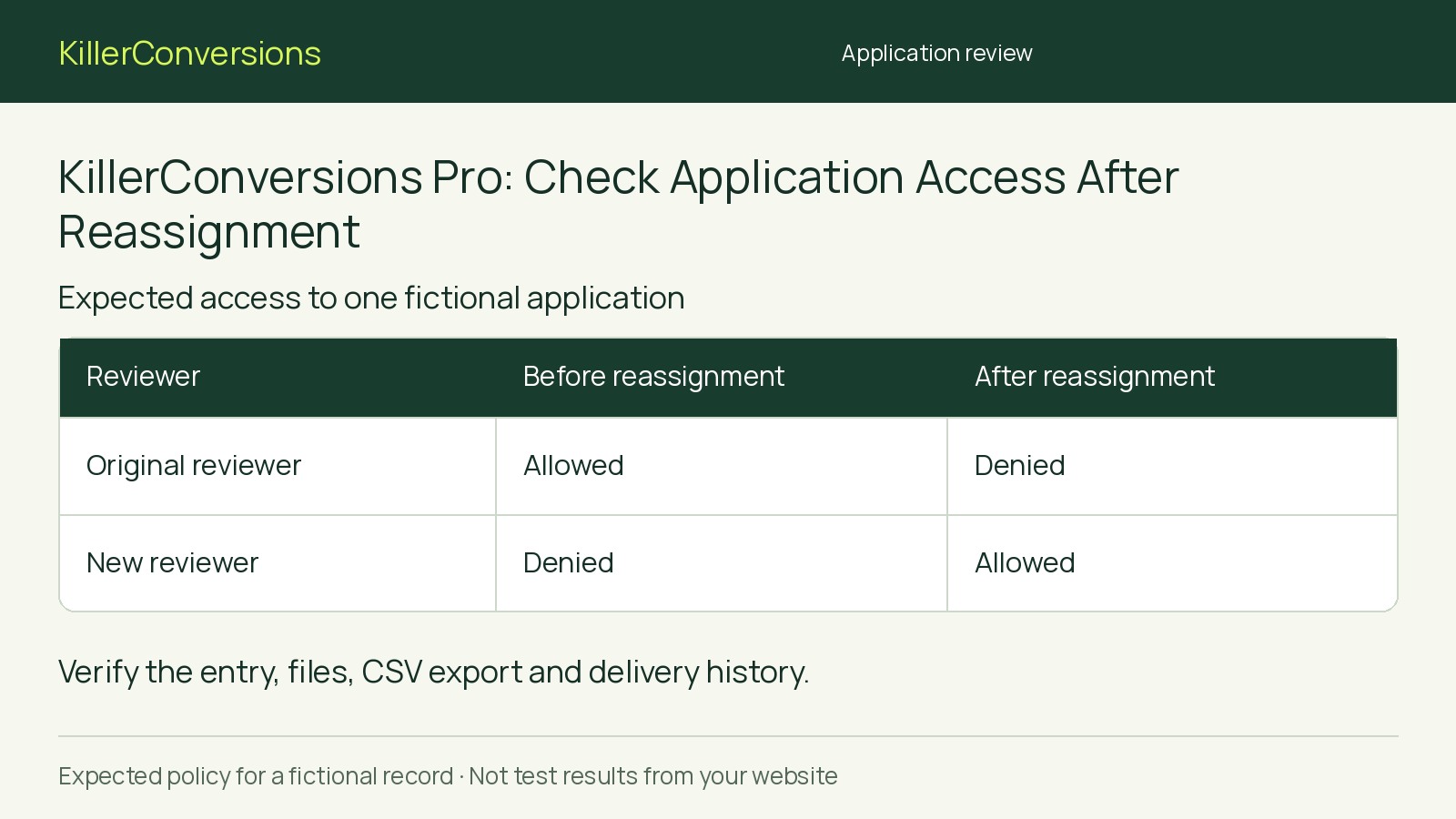
Before delegating application review, reassign a fictional completed application between two restricted accounts and check each account’s access to its entry, files, CSV data and delivery history. Removal of the former reviewer’s access is an acceptance requirement to verify, not an assumed result of reassignment. Record expected and observed access before approving the handoff.
What Pro’s documented scopes establish
KillerConversions Pro documents form/assignee scopes across entries, files, exports and delivery. Here, assignee means the reviewer assigned to an application. Free retains useful enquiry forms, basic conditional fields, local entries, CSV export and ordinary notifications. In the 0.15.0 launch baseline, estimate calculations, multi-step forms and private file uploads require the separate Pro add-on. This evaluation also uses Pro’s restricted staff access.
The documentation does not establish every reassignment edge case. This is a staging evaluation procedure, not evidence that these checks have passed.
Prepare accounts and identifiable test data
For a clean staging installation, activate Free 1.1.2, then matched Pro 1.1.2; keep Free active. Pro 1.1.2 remains compatible with Free 0.15.0 or later. Website and account downloads supply the matched 1.1.2 pair. Activate a valid Pro licence for this installation before using its tools; downloading alone creates no subscription.
Check the installation requirements: WordPress 6.5+, PHP 8.0+ for Pro, and MySQL or MariaDB with InnoDB tables. Multisite and SQLite are unsupported.
An administrator should prepare two non-administrator accounts, A and B, using the documented scope controls. Use separate browser profiles, each signed in only as its reviewer—not as an administrator.
Create the three fictional completed applications defined below. Put each unique label in an exported answer field and inside its sample PDF. Stay within the displayed effective upload allowance, use controlled notification destinations and disable unrelated integrations.
As administrator, confirm each entry, attachment and delivery-history item exists. Record application and file links exposed by the normal workflow rather than guessing addresses. These let reviewers attempt access even when navigation hides a record. A delivery record does not prove inbox receipt.
Define the policy and prepare the access record
Use this hypothetical policy across all four areas: reviewers may access only applications assigned to them within one designated form. Once reassignment is saved, every new request must follow the new assignment.
- Target, designated form: Initially assigned to A: A allowed, B denied. After reassignment to B: A denied, B allowed.
- Same-form control: Assigned to A throughout: A allowed, B denied in both phases.
- Different-form control: Assigned to the administrator outside both reviewers’ permitted work: both denied throughout.
These are expectations, not promised plugin behavior. If the available controls cannot express this policy, resolve that fit question rather than broaden access.
Prepare 12 records: two phases, two reviewers and three applications, each covering entries, files, exports and delivery history. Capture installed versions, roles and scope settings once for the run. Use this outline for each record:
- Phase: Before or after reassignment.
- Reviewer: A or B.
- Application: Unique fictional label.
- Expected: Allowed or denied for each area.
- Observed: Allowed, denied, unavailable or inconclusive for each area; separate existing-session and fresh-session results.
- Evidence: Resource reference, request or export, observation time and authorized-account comparison where needed.
Run the baseline, then reassign only the target
Before reassignment, check all three applications under both accounts. Confirm the signed-in identity each time. Fresh access means making a new request while signed in, not reopening a downloaded copy or relying on content already displayed.
- Entries: Inspect listings and attempt to open recorded application links.
- Private files: Attempt a fresh open or download using the recorded file links; identify returned content by its fictional label.
- CSV exports: Generate a fresh export with filters broad enough to expose unintended inclusion. Search for all three labels. Repeat for each format the team will use.
- Delivery history: Inspect records associated with each application without resending notifications.
A hidden listing, missing button, broken link or generic error is not sufficient evidence of authorization denial. For ambiguous failures, confirm the same resource works for an authorized account. If the reason remains unclear, record “inconclusive.” Mark anything that cannot be tested “unavailable,” not “denied.”
Have the administrator reassign only the target to B and confirm the change is saved. Leave roles, scopes, forms and control assignments unchanged.
Repeat every check in the existing reviewer sessions, refreshing views and retrying links. Then sign out and back in under each reviewer account and repeat. If an existing session can still fetch restricted data, a successful fresh-session check does not satisfy this policy.
Interpret the results before delegating
- Supported: Every required observation matches the policy, including A retaining the same-form control and B gaining the target. This supports delegation only in the tested configuration.
- Blocked by a mismatch: Resolve the mismatch and rerun. Missing export capability is also a functional mismatch if reviewers must export.
- Unverified: A required check is unavailable or inconclusive. An unavailable export cannot demonstrate correct row-level filtering.
The different-form control demonstrates exclusion for that particular record, not independent proof of how form and assignee scopes combine.
Hypothetical worked decision: Suppose A loses the target’s entry view but a new file request while signed in still returns its attachment. That fails the handoff requirement even if B gains access correctly. This is an illustrative possibility, not an observed product result. Retain the reproducible request and scope details, assign investigation and withhold live delegation.
Hand off the decision and manage retained copies
Live access restrictions cannot recall earlier downloads, CSV exports, emails or content already displayed. They do not govern hosting or backup access. Define responsibilities for retained copies.
Completed private uploads are not encrypted at rest, and file validation is not antivirus. This evaluation does not establish legal compliance.
If restricted handoff remains unresolved, an already-authorized central operator can review applications and share only necessary material through an approved channel. Free may suit central review; this manual alternative is not scoped live access and creates copy-handling work. Do not grant administrator access to bypass restrictions.
Next step: Give the responsible owner the completed access record, decision and assigned unresolved actions. Delegate only after required checks pass; repeat the evaluation after relevant permission or plugin changes.