Install Free first, then Pro 1.2.6 without uninstalling. Pro requires Free 1.2.5 or later and successful licence activation for this website. The current workspace licence location requires Free 1.2.6; older compatible Free uses the standalone Plugins page. Free remains available on WordPress.org.
Pro, Studio and Agency have the same Pro features: US$49, US$99 and US$199 per year for 1, 3 and 10 websites respectively, excluding applicable VAT. Test and staging sites count within the allowance. Read current purchase terms before subscribing.
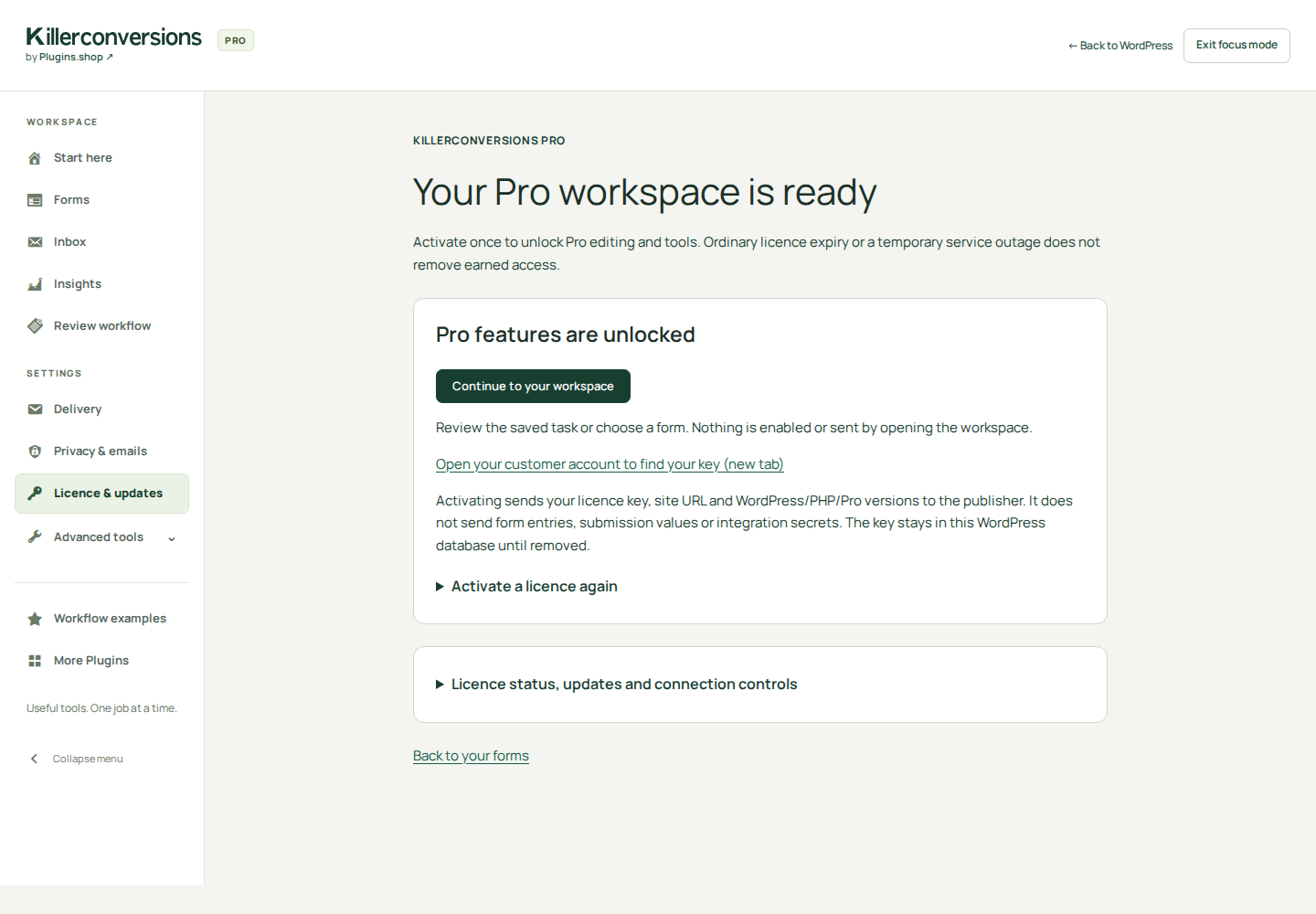
Screenshots retain their actual capture version. The licence screen is a genuine 1.2.6 local example with simulated activation; older workspace and email-setting images are dated where shown. Historical release notes and previous manuals remain on the website.
Install Free. Add Pro if you need it.
In WordPress, open Plugins → Add New Plugin, search for KillerConversions, then choose Install Now and Activate. You can also download Free from WordPress.org and upload the ZIP through Upload Plugin. Individual activation opens the KillerConversions workspace; your first activation starts at Start here.
For estimates, multi-step forms or uploads, download, upload and activate Pro 1.2.6 from your account. Pro 1.2.6 requires Free 1.2.5 or later. Keep Free active. A new individual Pro activation opens its licence screen. Enter your key and activate it for this website before using Pro tools. Open KillerConversions → Licence & updates under Settings to return to this screen. See the licence navigation and legacy-bookmark guide.
Free’s local features do not require an account or purchase. Before publishing your form, check a controlled submission, your mail transport and any enabled provider in your own environment.
Check WordPress and hosting requirements
WordPress 6.5+; PHP 7.4+ for Free or PHP 8.0+ for Pro. Use MySQL or MariaDB with InnoDB tables; SQLite and WordPress Playground are unsupported. Free text validation works without PHP mbstring. Pro PDF generation requires mbstring; itemised estimates need 64-bit PHP integers. Encrypted visitor drafts need Sodium. Integrations need cURL, a working CA bundle and public IPv4 HTTPS connectivity. Multisite networks are not supported in this release.
Your first contact form · Free
Create a form and choose the contact template. Free includes eight core templates.
Select a question to edit its label, type and help. Add, duplicate or reorder only what you need.
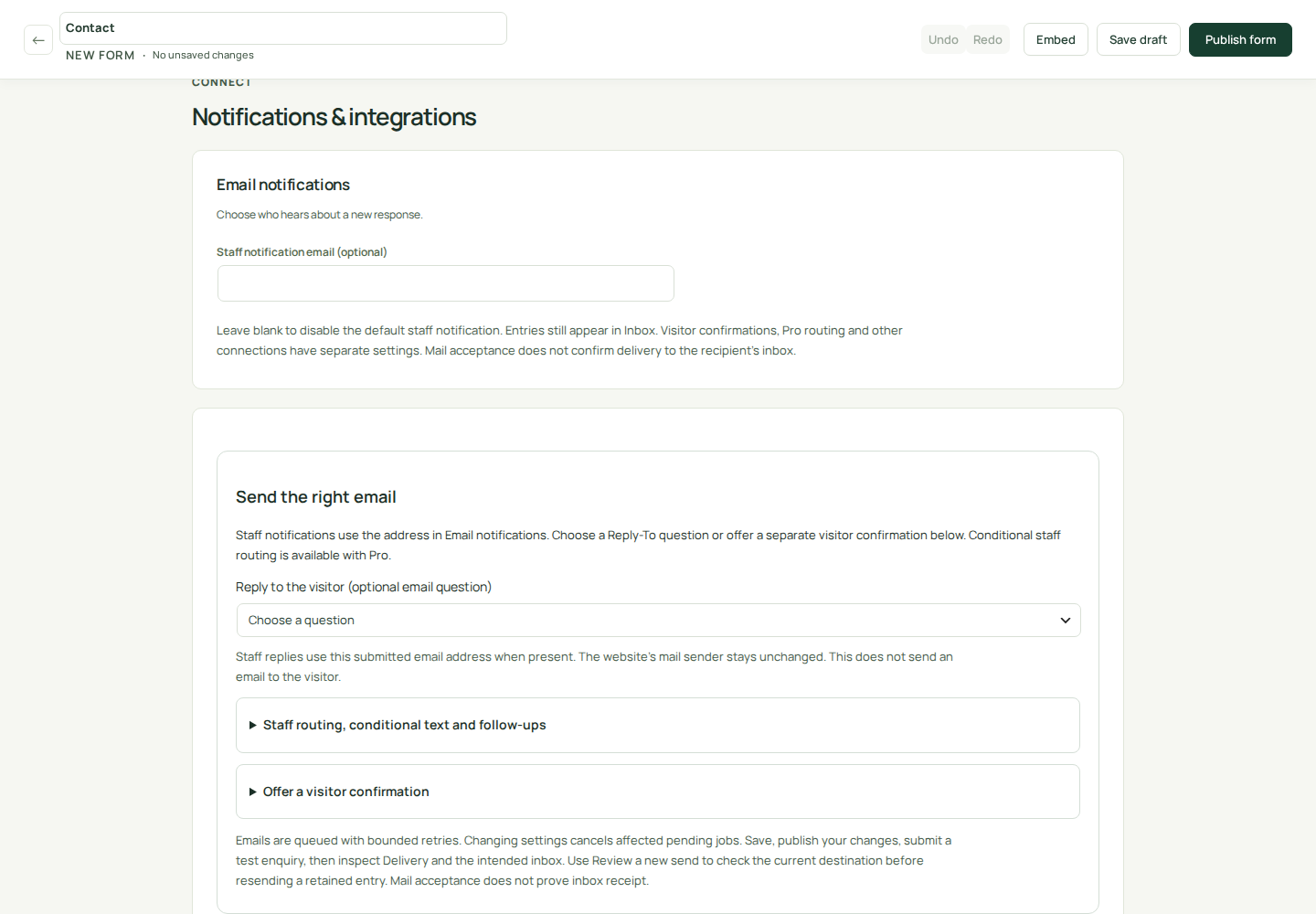
Open Connect if you want staff email and enter the recipient deliberately; leave it blank to use Inbox only. A new, unsaved form starts with default email settings without an incomplete-configuration warning. Existing invalid saved settings still need correction. Review Settings for spam protection and new-entry retention.
Try the desktop and mobile previews, then choose Publish form. Review Published settings: it describes the saved public form, including any configuration problem or paused delivery. Unsaved edits are not active. After later updates, choose Review published settings to reopen this summary.
If the default staff email is off, choose Set up email notifications or expand Use Inbox only for local follow-up guidance. That choice does not select or remove a recipient.
Add the KillerConversions block or shortcode to a page. Submit a controlled example through that page and find it in Inbox. If email is configured, confirm receipt with the intended recipient separately.
[killerconversions id="123"]
Replace 123 with your form ID. Preview uses the current design without submitting or storing test answers; your theme may style the published page differently. The newsletter template stores a local request. Remote subscription needs a configured connection and appropriate visitor consent.
Actual 1.2.5 editor on a local example site. Staff email stays off until you choose a recipient. Open the full-size settings view.
Check validation before launch
Submit a controlled test with an invalid email address and confirm that the email-specific message explains what to correct. An empty required answer shows the required-field message. Test conditional follow-up questions too: they use the cleaned answer that is stored in Inbox, including when text contains stripped tags or percent-encoded octets.
Choose what you want to build
Free includes contact, agency brief, quote enquiry, consultation, feedback, newsletter interest, service enquiry and callback request. Pro adds estimate and multi-step application starters.
Pro starters cover tiered service pricing, minimum-callout estimates, volume pricing, conditional extras, document review, staff routing, CRM qualification and webhook handoff. Replace example prices and destinations; applying a design does not enable a provider.
Choose the simple estimate template. Open Add pricing when pricing is unused, or Estimate pricing when it is already configured. Edit the quantity question and price rows.
Set your currency and unit prices; add selected fixed-price extras. You do not need to write a formula.
Try zero, typical and maximum quantities and each optional extra. Hidden questions must not affect the total.
Publish, submit an example and compare the stored breakdown, email and print summary with your expected amount.
The server calculates the accepted amount. Inputs, currency, price revision, line items and total are retained with the entry; later edits do not rewrite it. An estimate is not payment collection or a final invoice.
Advanced Pro estimates
Use Pro for base and minimum charges, tiered rates, conditional extras and reusable formula examples. Volume tiers apply the selected tier’s unit price to the whole quantity; graduated tiers charge each band separately. Save expected-total examples and review the pricing change before publishing. Use the local PDF action for a document generated from the retained estimate.
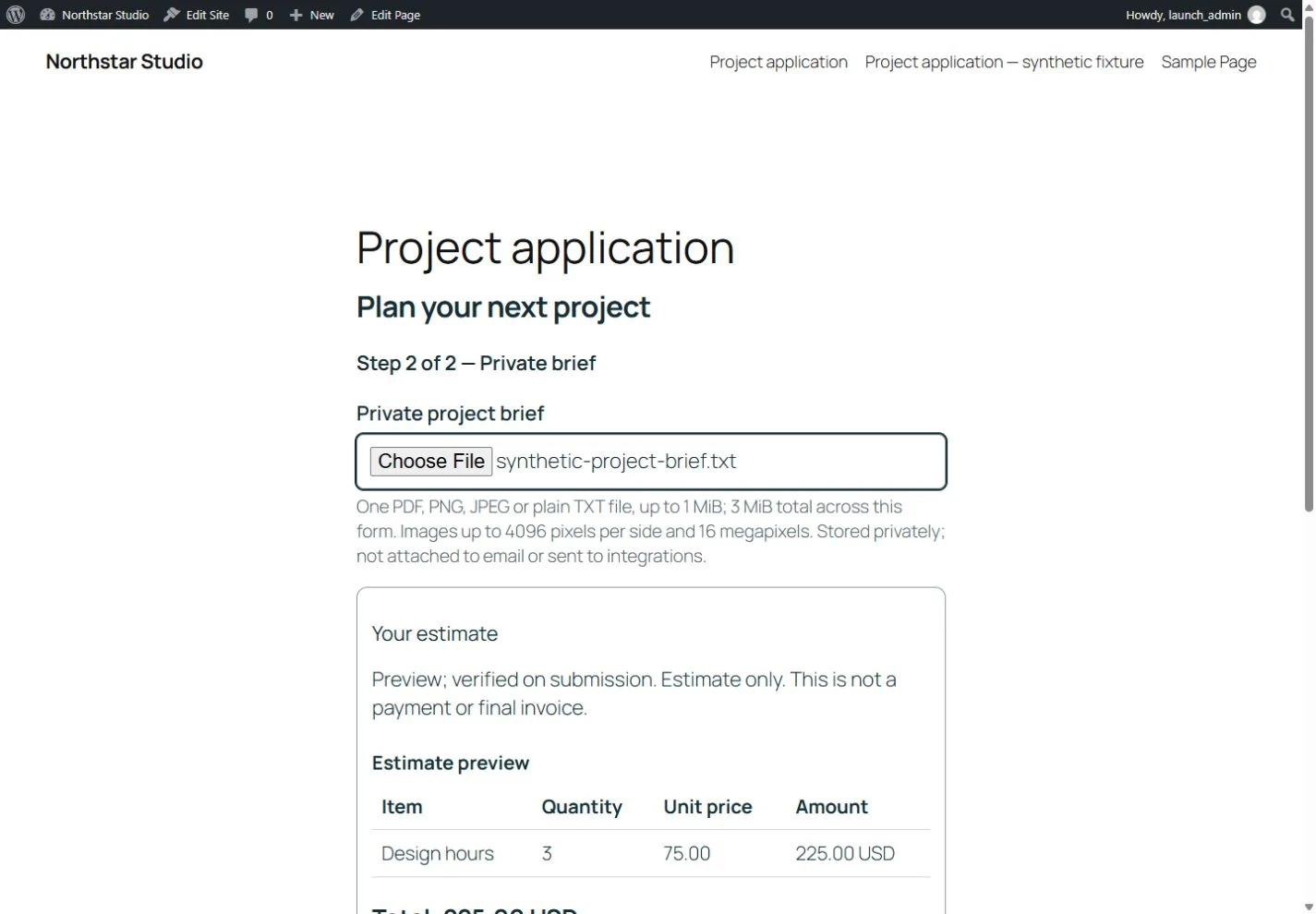
Historical Free 0.12.0 (before the 0.15.0 edition split) · Fictional sample data. Step two of a multistep application: private brief and a 3-hour, USD 225 estimate.
Accept multi-step applications · Pro
Choose the job, document or volunteer application template. Keep only questions you need.
Review the questions and step labels. Check required fields and the Next/Back controls.
If you need supporting files, review the eligible file types and choose realistic limits. Private uploads with a completed application require the activated Pro add-on.
Review your notification recipient and retention settings, publish the form and add it to a page. Test a completed application and find its answers and eligible files in the WordPress Inbox.
Free includes enquiry forms and basic conditions. Pro supplies multi-step applications and completed private uploads. Check file limits and storage before publishing.
Let visitors save and resume · Pro
Install compatible Pro alongside Free and complete first license activation before enabling visitor save/resume.
Review draft expiry, consent wording and private draft storage. Publish deliberately; enabling save/resume is separate from ordinary completed uploads.
Test selecting files, saving, reopening the private link in a new browser session, completing and deleting the application.
Drafts contain encrypted eligible answers and attachments. A resume link gives access to that draft: keep it private. Marketing and confirmation choices stay separate and need a fresh decision on resume. Expiry and quotas apply; saving is never a promise of indefinite retention.
Free includes basic entry assignment. Pro adds named review stages, notes, optional due dates, scoped team access and private locally generated application PDFs. Application and review guide.
Follow up in Inbox and export CSV
Accepted entries stay in WordPress. Search and filter, use local or UTC dates, assign follow-up and star important leads. Export a verified wide or long CSV. New entries retain the labels visitors saw; older entries explicitly use current-label fallback.
Lead managers can handle entries without configuring the site. Administrators can review retention health and run expired-entry cleanup. Entry storage and delivery jobs commit together; queue-storage failure rejects the submission so the visitor can retry. Inbox, export limits and permissions.
Send staff email and optional confirmations · Free
The default staff notification starts off: no address is selected automatically. Accepted entries still appear in Inbox. To enable the default notification, open Connect, enter a Staff notification email and choose Publish form. Leave the field blank for Inbox-only follow-up; visitor confirmations, Pro routing and other connections have separate settings.
Map Reply-To to an email question; the site-controlled From sender stays unchanged. To offer a visitor confirmation, use a separate optional checkbox and the visitor’s email field. The Add a confirmation checkbox button creates and maps an unchecked, optional question; review and enable requested confirmations separately. A normal submission is not newsletter consent.
Free queues messages with bounded retries, failure status and guarded resend. Pro estimate messages include the saved itemisation. Marketing subscription, transactional confirmation and saved application links remain separate purposes.
Pro staff routing and follow-ups
Up to five ordered rules can select a fixed staff recipient and extra plain-text message. The first matching rule wins; hidden answers never match. Preview all destinations before acknowledging changes. Optionally send one unread-entry reminder to a fixed staff address after 1–168 hours. Marking the entry read suppresses it. Changed destinations cancel old pending work instead of rerouting it.
Published settings shows the saved recipient, configuration problems or a copied-site delivery pause. A configured recipient is not verified delivery. Submit a controlled example on the published page, find the entry and inspect delivery status, then check the intended recipient’s inbox and spam folder. The plugin does not configure SMTP. Queue retries depend on working WordPress cron.
Reduce spam · Included in Free
Built-in honeypot and submission rate limiting, plus optional Cloudflare Turnstile included in Free. The basic protections remain active without a vendor account or Turnstile setup.
Open the form’s Settings → Spam protection. Turnstile starts off.
If you want this extra layer, create a Managed Turnstile widget for your website hostname. Add its site key and secret, review and acknowledge the external service, then enable protection.
Publish the form and test its real public page. The editor preview does not load Turnstile. Protected submissions require JavaScript and successful server verification.
An invalid enabled configuration blocks protected submissions until you correct it or publish with Turnstile disabled. This avoids presenting a broken configuration as active protection. No anti-spam measure guarantees that every unwanted submission is stopped.
Enabled forms load Cloudflare’s widget, and the server sends the secret and challenge token for verification. Form answers and files are not sent to Turnstile. Update your site’s privacy notice. Cloudflare Turnstile privacy · Cloudflare terms.
Save privately. Publish when ready.
Save draft keeps a new form unpublished.
Save draft keeps edits to a live form private. Visitors continue using the published questions and settings.
Publish form applies the reviewed configuration to the public form.
Discard saved draft changes returns to the live form.
A conflicting save keeps your editor open so you can compare with the latest version. Saved design history retains 10 designs; restore brings the title, questions, logic and appearance into the unsaved editor for review. It does not restore recipients, credentials, privacy settings or entries.
Editing tools and field limits
Use Undo and Redo while editing, with optional browser-local recovery. Number, date, time and text limits are checked by the browser and server; autofill hints help visitors complete appropriate fields. Free includes basic field conditions. Pro adds multi-step forms, nested conditions and safe forward step branching.
Repeatable questions · Free
Use a repeatable group when visitors need to add another reference, person or item. In Build, add a Repeatable group, name it and configure the questions inside each row. Set the minimum and maximum rows before publishing.
Each form supports up to three groups, each with up to ten rows and six questions per row. Supported answers are short text, email, number, date and dropdown. Visitors can add or remove rows with labelled buttons. Repeated answers are retained in saved applications and shown with their original question labels in entries, staff email and CSV.
Groups require JavaScript. Nested groups, repeated uploads, consent questions, pricing dependencies and conditional rules involving a group are not supported. Use separate ordinary fields for uploads, confirmation requests and marketing choices. A group may be placed within a form step.
Test adding, removing, saving and reopening rows before publishing. Exported designs containing groups use blueprint format 6 and require version 0.11.0 or later.
Connect a newsletter or CRM
Free provides basic Brevo and MailerLite cards under Connect. Pro adds the guided Connect HubSpot, Slack or a webhook path for those advanced integrations.
For Brevo or MailerLite, open its Free card under Connect. For an advanced integration, choose Connect HubSpot, Slack or a webhook and select the intended provider.
Enter the destination’s credentials and map only the answers it needs. Enable it and acknowledge the selected data transfer.
For Brevo or MailerLite, map a separate optional marketing-consent checkbox. Only entries with that choice checked qualify.
Save the draft, then open Connection test on its saved integration card. Review the synthetic payload and destination before explicitly authorizing the test.
Check the intended provider yourself. Publish the reviewed configuration, then test a real form submission with an address you control.
Opening the guide, reviewing setup and saving settings make no provider request. An authorized test does: subscriber tests can trigger Brevo or MailerLite automation. HubSpot creates or updates contact details without setting marketing-subscription status. Provider setup and troubleshooting.
Turn follow-up into a working queue · Pro
Open Review workflow. Choose a stage, Due today, Overdue, an assignee or an outcome; click a count to open its matching entries.
Use Save current filters to keep a useful filter combination for your next visit. Each staff account can save up to ten views on this site. Opening one always checks current access.
Open an entry to inspect Earlier enquiries using this email. Select the submitted address when several are available. These are retained local matches, not a verified identity or a merged contact profile.
Choose Export filtered entries when you need the current review stage, UTC due date, outcome and assignee alongside submitted answers.
Due dates use UTC. Closed stages still count as overdue until their dates are cleared. A due date does not send an email. Queues and earlier-enquiry matches exclude expired entries and respect each operator’s form and assignment scope.
The Pro review export is a separate download from Free’s wide/long CSV: up to 1,000 entries, 8 MiB and 15 seconds of preparation. Larger selections ask you to narrow the filters. Internal notes and uploaded file contents are excluded. Changed access or records stop the complete download so you can reload and retry. Queue, history and CSV limits.
Choose realistic private file limits
Pro accepts PDF, PNG, JPEG or UTF-8 TXT, one file per field. Standard size settings are 1, 5 or 10 MiB per file, with 15 MiB combined. New forms start at 5 MiB; legacy unset limits stay at 1 MiB. To set a larger combined allowance, explicitly enable Pro attachment policy: up to five file fields, 10 MiB each and 25 MiB combined, reduced by host limits. Your saved explicit settings remain in force.
PHP request and memory capacity, database packet size and site storage can lower the displayed effective allowance. Web servers and proxies may impose further limits. Unsupported formats include SVG, HTML, scripts, archives, office documents and HEIC. Validation is not antivirus.
Completed files are private database records, not encrypted at rest. Draft files use encrypted draft storage. Entry deletion and retention include files and linked workflow records. Quota exhaustion gives a clear retry/recovery message and must preserve an existing saved application. Limits, storage and cleanup.
Check delivery and site changes
Use Delivery to inspect per-job attempts, revision and consent provenance, failures and guarded resend. Free includes email and basic Brevo/MailerLite subscriptions; Pro adds HubSpot, Slack and signed webhooks.
Background work depends on a functioning WordPress scheduler. After a change from the recorded site address or environment, outgoing work pauses until an administrator reviews the site, destinations and retained jobs. This covers Free delivery too. Identical-identity copies and copies made before the initial baseline still need your own review.
Retries and uncertain delivery
Temporary failures retry up to six times per cycle with bounded backoff; eligible failed jobs allow up to three manual replay cycles. Publishing changed destinations cancels earlier work. At-least-once delivery can duplicate a message after a lost response. Webhook receivers should deduplicate delivery IDs. Provider acceptance does not establish final receipt.
Measurement is off by default. Enable the optional visitor choice; only consenting visible form exposures enter the funnel. Reports show views, starts, reached steps, validation friction and accepted submissions by form, revision and UTC window.
Review leads as unreviewed, qualified, unqualified or won. Reports separate all stored submissions from the consented exposure cohort and label rate denominators. Unreviewed never means rejected.
Understand the limits of a conversion rate
Measurement uses neither cookies nor localStorage. Unchecking removes the current visit’s measurement without deleting the entry. Selection bias, bots, blocking and incomplete reviews affect interpretation. A/B experiments and winner promotion are not included. Measurement definitions.
Compare completed periods · Pro
In Insights, enable Compare previous period. Choose the last 7, 30 or 90 completed UTC days, or a custom range of 1–90 completed days. Today is excluded; the comparison uses the immediately preceding period of equal length.
This reads existing records without enabling measurement or changing consent. Submission totals use the submission date; qualified and won figures reflect the entries’ current reviews. They are not historical status snapshots. Retention, erasure and time available for review affect both periods.
Consented exposure samples remain separate from all submissions. Missing observations do not mean zero visitors. Rate differences appear as percentage points only when both denominators exist, and measurement comparisons are unavailable across the 90-day retention boundary. Insights needs all-entry access; scoped staff use Review workflow. Definitions and comparison limits.
Update an existing 0.11.10 or later installation
Pro 1.2.6 requires Free 1.2.5 or later. Install Free first, then Pro. If a dependency notice appears, update Free before activating Pro. Saved settings and queued jobs remain stored; complete both updates before checking your workflows.
Back up your WordPress database and files. Try the update on staging first.
Update Free through Plugins → Installed Plugins when an update is offered, or upload the Free ZIP from WordPress.org and replace the installed Free plugin.
If you use Pro, immediately upload Pro 1.2.6 from your account and replace it too. Do not uninstall either plugin.
Review saved forms, recipients, connections and file limits. Submit a controlled example and check both Inbox and the intended destination.
Use matching Free and Pro 1.2.6. This release requires successful first license activation on each installation, including when updating an older ungated Pro copy. An incompatible pair pauses Pro-dependent forms and blocks their editing and preview until both updates are finished. A moved or copied site may also need delivery authorization.
Earlier preview releases use older internal storage identifiers. This release does not provide an automatic migration from those previews. Keep an untouched backup or separate preview site; do not uninstall it to transfer data. For a fresh installation, follow the steps above.
Find Licence & updates
With the current Free and Pro 1.2.6 pair active, open KillerConversions → Licence & updates. It appears under Settings in the workspace sidebar. On a narrow screen, open Menu first. Licence controls are available to an administrator who can update plugins.
Find your licence key in your customer account. Use the licence key, not the separate account access code.
Enter the key and choose Activate Pro. Activating sends the licence key, site URL and WordPress, PHP and Pro versions to the publisher; it does not send form entries or submission answers.
After activation, continue to your workspace. Expand Licence status, updates and connection controls when you need to review the saved status or deliberately change the connection.
Opening the screen only shows local saved information. It does not activate, check with the publisher or disconnect the licence. The existing activation and disconnect confirmations still apply.
An existing Plugins → KillerConversions Pro licence & updates bookmark still opens the licence page. The separate Plugins menu item is hidden when the current workspace location is available.
Pro 1.2.6 supports Free 1.2.5 or later. With Free 1.2.5, or while Free is inactive, use the standalone Plugins → KillerConversions Pro licence & updates screen. It keeps WordPress navigation and an Open installed plugins link. Keep compatible Free active to use Pro tools; update Free first to get the current workspace navigation.
The sidebar keeps Forms and Inbox close to hand. Settings and Advanced tools group the other screens you can access. With Pro installed, administrators who can update plugins can open Licence & updates under Settings. The current page stays highlighted; available Pro tools appear after Pro is activated. On a narrow screen, use Menu to open or close navigation.
Exit focus mode brings back the WordPress navigation. Back to WordPress leaves the plugin workspace. Your focus preference is saved for your WordPress account on this site; ordinary updates do not change it.
More Plugins sits after Explore Pro, or Workflow examples when Pro is activated. It shows other Plugins.shop products, their requirements and useful companions. The collection and logos are bundled locally. Opening it does not fetch a remote catalog, track your browsing or install another plugin; selecting an external product link opens that website in a new tab.
Start here, then choose what to share
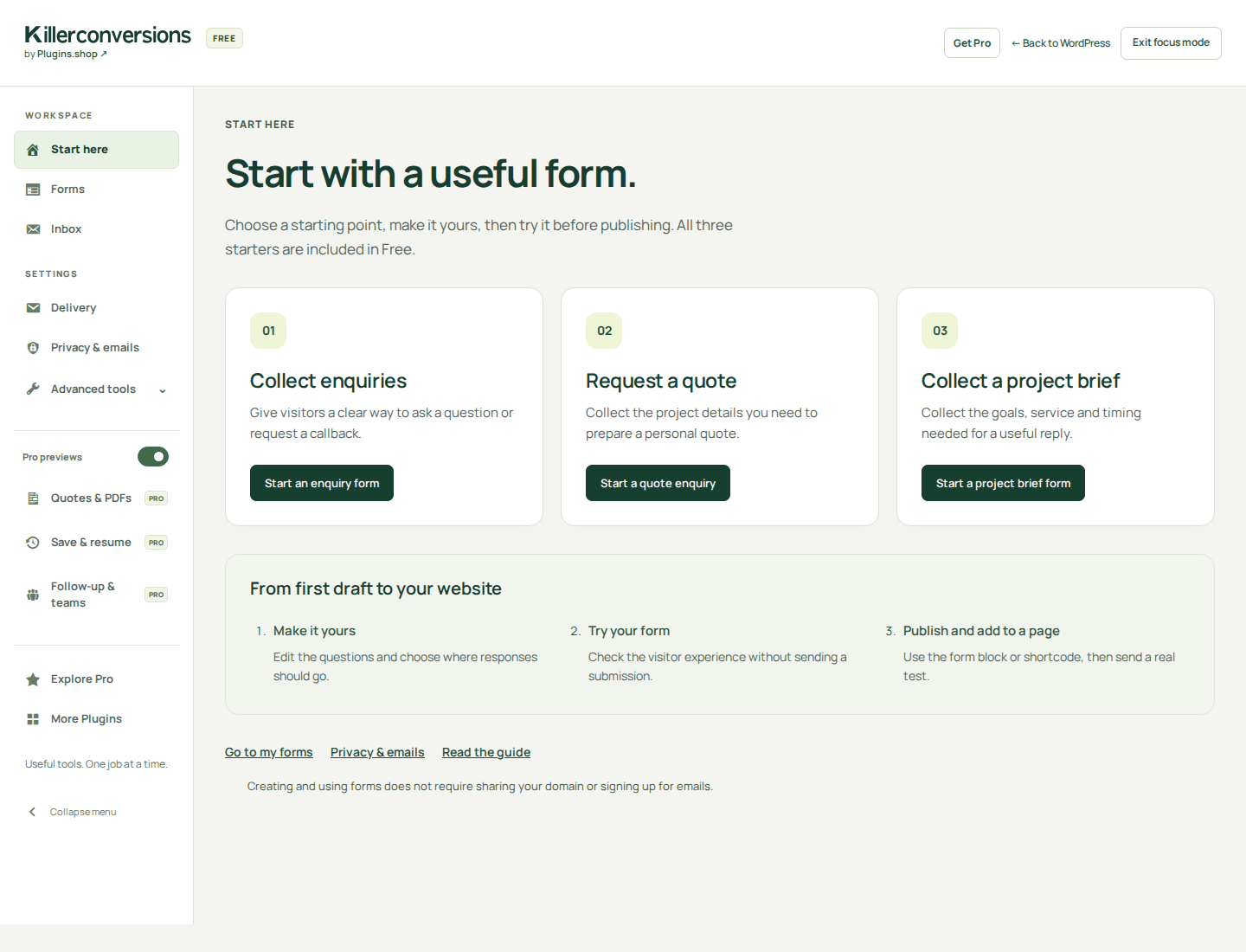
After the first individual Free activation, KillerConversions opens Start here. Choose Collect enquiries, Request a quote or Collect a project brief. Exit focus mode brings WordPress navigation back; Back to WordPress stays available. Your focus preference belongs to your account on this site. Later individual activations return to your forms. Bulk activation, network activation and plugin updates do not redirect you.
After your first successful form save, an optional invitation offers two separate choices: share the displayed website domain, or request tutorials, product updates and occasional offers by email. Both choices start unchecked. Continue without sharing keeps all Free features available. Your form stays saved even if the registration service cannot be reached.
Open KillerConversions → Privacy & emails to review your choices. Website registration sends the hostname shown there. Email signup uses the editable address and requires confirmation from that inbox. A signup request is not a confirmed subscription. These choices are independent of visitor consent inside your forms and of Pro license activation.
Stop site sharing independently of email preferences. The settings explain whether an email request can be cancelled there or needs its private unsubscribe/preferences link. A failed removal remains visibly pending so you can retry. Read the registration and email privacy details before choosing.
Explore a Pro workflow without changing your form
Quotes & PDFs, Save & resume and Follow-up & teams show labelled examples, short setup steps and a comparison with what Free already includes. View an example from the related setting, or open Explore Pro. Previewing does not save a form, enable a feature, send a message or subscribe you.
Use the hide control beside Pro previews to remove the premium shortcuts from your sidebar, then Show Pro previews to restore them. Explore Pro stays available. This preference is saved for your WordPress account on this site and is separate from the contextual suggestion controls inside the editor.
Remember this workflow is an explicit local action retained for seven days. After installing and activating Pro, continue the saved task or choose another. Changed or deleted forms must be reviewed before continuing.
All Pro plans contain the same feature package; their website licence allowances differ. A fresh Pro installation opens licence activation. Enter your key and activate it for this website. Existing activated installations open the workspace. Connections, publishing and sending still require your deliberate setup.
Plans, updates and support
Annual plans include 1 website licence on Pro, 3 on Studio or 10 on Agency. All include the same Pro features. Each separate website uses one licence, with no additional staging allowance. Prices and terms · Pricing guide.
Annual plans are available on the pricing page. A manual plugin download alone creates no purchase or support subscription. Free local features do not require an account. Pro tools require successful first license activation on this installation. After that, ordinary expiry or a service outage does not disable installed tools. Local Disconnect or Forget clears activation; a moved or copied site also needs activation. Updates, new downloads and support require service eligibility; see the Pro readme for their data disclosures. Public support starts with these docs and the support form. No response time is guaranteed.
Keep control of your data
Completed entries live in WordPress. Optional connections send selected data to their configured providers. No form-use analytics are sent to KillerConversions. Review your own notices, consent and staff access before using the plugin.
If a submission’s connection result is uncertain
New browser submissions keep a retry identifier in the open page. Retry that same attempt without reloading. Completed attempts are recognized while their retained entry exists. Fresh page loads, older clients and the no-JavaScript fallback do not share this protection. A changed form asks new browser pages to reload and review before accepting new answers.
Retention, measurement and erasure
Entry retention defaults to 90 days and can be set to 1–3650 days; changes apply to new entries. Published settings shows the saved period. Entries become eligible for scheduled removal after that period; actual cleanup depends on working WordPress cron. Existing entries keep their original expiry. Large expired-entry cleanups continue in bounded scheduled batches. Retention health identifies queued or overdue continuation work, and the daily cleanup remains a fallback. Measurement retention is up to 90 days through scheduled cleanup. It retains no answers, page URLs, device fingerprints or raw visitor IPs; consented completions link to local entries and reviewed outcomes. Entry erasure removes related jobs, measurement and outcomes. WordPress privacy export and erasure use submitted email fields. Provider copies, hosting logs, mail and backups have separate removal processes.
Pro review preferences and earlier enquiries
Named saved views store your chosen filters locally for your WordPress account on that site, up to ten views. They are checked against your current access whenever opened. Delete them individually; WordPress personal-data export and erasure include them while Pro is active. Deactivation retains them, and explicit full-data uninstall removes them.
Earlier-enquiry history reads retained entries using an existing submitted-email index. It collects no new visitor data and does not merge or verify identities. Review CSV downloads contain retained submitted answers and current workflow fields, excluding internal notes and uploaded file contents. Keep downloaded copies private; local erasure cannot remove copies you have downloaded. Period comparisons read existing records without enabling measurement or changing consent.
This website’s playground and hosting
The small homepage form preview uses memory only and never sends example answers. The separate WordPress playground uses temporary practice workspaces that expire after 30 minutes. Use fictional data only. Email and external integrations are disabled in those workspaces. Read the playground’s privacy and limits before opening a workspace. Fonts and logos are served locally without a Google Fonts request. This website uses a GoDaddy VPS in the United States and Cloudflare; these providers process connection information to deliver and protect it. For security, our origin records connection IP addresses, timestamps, request methods, grouped routes, response status, response sizes and timings. This security log does not include full URLs, query strings, request bodies, cookies or authorization headers. Hosting providers and separate administrative records may process additional information.
1.2.6 · 9 November 2026
Licence & updates now sits under Settings in the KillerConversions workspace. Activation links and licence-action returns lead to the same page, with the current navigation item highlighted.
Existing Plugins-page bookmarks remain valid. When Free is inactive, or an older compatible Free version does not support the new workspace location, Pro keeps a standalone licence screen under Plugins. Opening the page does not activate, disconnect or change the saved connection.
Install matched Free and Pro 1.2.6, Free first, without uninstalling. Pro 1.2.6 still supports Free 1.2.5 or later. Licence permissions, activation requirements, updater checks, saved forms and entries are unchanged.